
If you've inherited a codebase from a previous developer, don't change it yet. Spend five working days auditing it first.
Prove it builds from a clean clone, scan dependencies, licenses and secrets across the full git history, and measure types, tests and CI. Then find the files that change most, and write a one-page findings report that decides between fix, refactor and rebuild.
This checklist is for a CTO or technical founder who has been handed a React and TypeScript codebase by a departed employee, a freelancer or a previous vendor. Every check has a healthy result and a red flag, and most have a command you can run.
What should you do first when you inherit a codebase?
Freeze non-urgent changes and confirm you control every account the product runs on. Then block five working days for the audit before you promise anyone a date.
Technical debt is the normal state of software, not the exception. In the 2024 Stack Overflow Developer Survey, 62.4% of professional developers named the amount of technical debt as a frustration at work. It was the most common answer (Stack Overflow, 2024). Inherited code arrives with that debt and without the context behind it.
Before Day 1, check that you have these in your own organization's name:
- The repository, with its full commit history rather than a zip file or a single squashed commit
- CI, hosting and the domain registrar
- Error tracking and logs
- Every secret and environment value the app needs to run
If any of these is missing or still sits in the previous developer's personal account, recover it before you audit. Our 30-day recovery protocol for a failed project covers getting accounts back and triaging a stalled project. This checklist is the deep version of that protocol's audit phase.
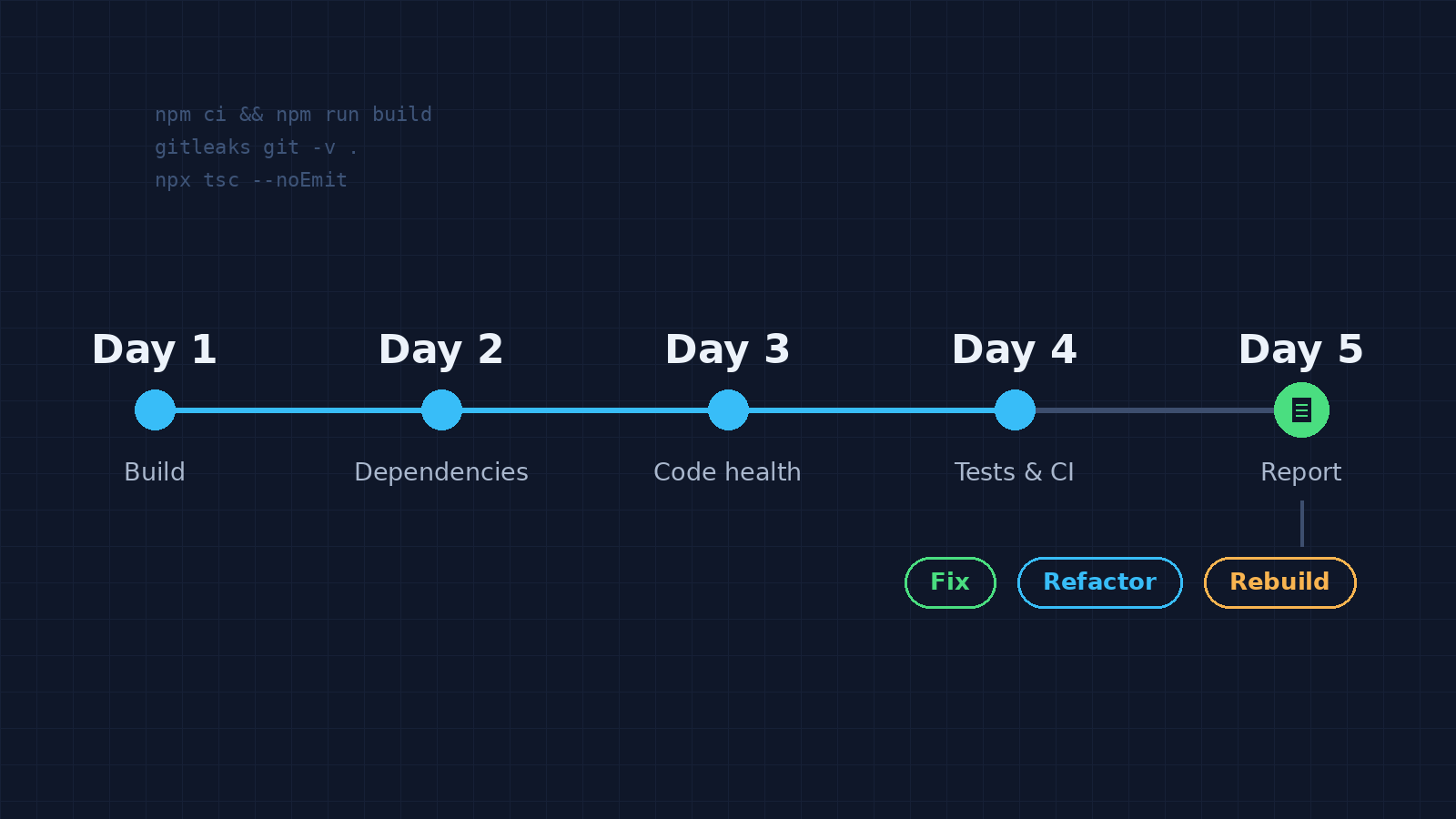
The audit runs in five one-day blocks:
Day 1, build
Get from a fresh clone to a running app, and check runtime and framework versions.
Day 2, dependencies and secrets
Scan for vulnerabilities, package age, licenses and leaked credentials across the history.
Day 3, code health
Measure types, lint output, file size and risky patterns.
Day 4, tests and delivery
Check coverage on the paths that matter, CI gates, deployment and rollback.
Day 5, hotspots and report
Find where change will hurt, then write the findings report.
Write each finding down as you go, with the command, the output and a severity. Don't fix anything during the week, with two exceptions. A live production credential in the history gets rotated the day you find it. A critical vulnerability in shipped code gets patched the same day.
Day 1: Does the app build from a clean clone?
Clone the repository onto a clean machine or container and follow only the README. If you can't install, build and run the app within a day, that's finding number one.
git clone <repo-url> audit && cd audit
git rev-list --count HEAD          # how much history you actually received
cat .nvmrc 2>/dev/null; npm pkg get engines
node -v
npm ci                             # installs exactly what the lockfile says
npm run build && npm test
npm ci fails when the lockfile is missing or out of sync with package.json. That failure matters: without a lockfile, two installs a week apart can produce two different apps. If the repo commits pnpm-lock.yaml or yarn.lock instead, use that tool's frozen install and its audit command throughout. That's pnpm install --frozen-lockfile, yarn install --immutable, or --frozen-lockfile on Yarn 1.
The Node.js project says production applications should only use Active LTS or Maintenance LTS (long-term support) releases. It lists Node.js 20, 18 and 16 as end-of-life (Node.js, 2026). An app pinned to one of those runs without upstream security fixes.
Then look for react-scripts in package.json. That means Create React App, which the React team deprecated on February 14, 2025, leaving it in maintenance mode (React, 2025). It isn't an emergency, but schedule a migration to a framework or a build tool such as Vite.
Finally, check the React version and how much code uses APIs that React 19 removed. These include ReactDOM.render, findDOMNode, string refs, and propTypes and defaultProps on function components (React 19 Upgrade Guide, 2024).
npm ls react react-dom
grep -rnE 'ReactDOM\.render|findDOMNode|\.propTypes|defaultProps|\bref="' src | wc -l
Class components can keep defaultProps, so check those hits before counting them. Zero hits clears the most common blockers, though your dependencies still need versions that support React 19. Hundreds mean the upgrade is a project, not a task.
The greps and find commands in this checklist assume a src/ folder. If the code lives in app/, pages/ or components/, search those instead.
| Check | Healthy | Red flag |
|---|---|---|
| Clean install | npm ci succeeds with the committed lockfile | No lockfile, or setup needs steps nobody wrote down |
| Build and tests | Both run from the README alone | Only work after a call with the previous developer |
| Node version | Active or Maintenance LTS, pinned in .nvmrc or engines | End-of-life major, or no pin at all |
| Build tooling | A maintained framework or build tool | react-scripts (Create React App) |
| History | Full commit history | One squashed commit, or a zip file |
Day 2: What's hiding in the dependencies and git history?
Scan four things: known vulnerabilities, package age, licenses and leaked secrets. Scan secrets across the whole history, because deleting a secret in the latest commit leaves it in every earlier one.
Black Duck's 2026 Open Source Security and Risk Analysis report audited 947 commercial codebases (Black Duck, 2026):
Run these from the repository root:
npm audit --omit=dev                     # known vulnerabilities in what ships
npm outdated                             # how far behind each package is
npx license-checker --production --summary   # licenses in what ships
npx knip                                 # unused files, exports and dependencies
gitleaks git -v .                        # secrets across every commit
trufflehog git file://. --results=verified   # secrets that still work
Gitleaks and TruffleHog are separate installs, not npm packages. TruffleHog's verification step contacts each credential's provider to test whether it still works.
Sort vulnerabilities by what ships to production first. A concrete example is CVE-2025-29927, a critical middleware bypass in Next.js, patched in versions 12.3.5, 13.5.9, 14.2.25 and 15.2.3 (Vercel, 2025). A self-hosted Next.js app below the patched release for its version line is a critical finding. The risk is highest when middleware enforces authentication.
Treat every secret in the history as live until proven otherwise. GitGuardian found that more than 64% of secrets confirmed valid in 2022 still worked when retested in January 2026 (GitGuardian, 2026). The fix is to rotate the credential at the provider first, then remove it from the code.
License findings need a different owner. Copyleft licenses, such as the GPL, can require you to publish your own source. Copyleft in shipped code, or packages with no identifiable license, are questions about who owns the code and what you can do with it. Have counsel read anything the scan flags.
| Check | Healthy | Red flag |
|---|---|---|
| Vulnerabilities | No critical or high findings in production dependencies | Critical findings in shipped code |
| Package age | Core packages within one or two majors of current | Core packages years behind, or abandoned |
| Licenses | All identified, all compatible with how you ship | Copyleft in shipped code, or unknown licenses |
| Secrets | No hits, or every hit already rotated | Working credentials anywhere in the history |
Day 3: How healthy is the code itself?
Measure the code instead of reading it file by file. Type errors, type-safety escape hatches, lint output and file sizes give you a baseline you can track after every change.
npx tsc --noEmit | grep -c "error TS"      # type errors today
npx tsc --showConfig | grep strict         # is strict mode on?
# Vite projects: add -p tsconfig.app.json to both tsc commands
grep -rnE ': any\b|\bas any\b|@ts-ignore|@ts-expect-error' src | wc -l
npx eslint . | grep -E '[0-9]+ problems? \('   # lint problem count
find src \( -name "*.ts" -o -name "*.tsx" -o -name "*.js" -o -name "*.jsx" \) -print0 | xargs -0 wc -l | sort -rn | head -11
grep -rn "dangerouslySetInnerHTML" src
grep -rhoE '(VITE|NEXT_PUBLIC|REACT_APP)_[A-Z0-9_]+' src | sort | uniq -c
The last command lists every client-prefixed variable the code reads. Variables with those prefixes are compiled into the JavaScript that ships to every visitor's browser. Vite's documentation says they shouldn't hold API keys (Vite). If the list includes anything named like a secret, a private key or a paid API token, that value is public.
dangerouslySetInnerHTML isn't automatically a bug. Each use should render sanitized or trusted content, and you should be able to say which.
| Check | Healthy | Red flag |
|---|---|---|
| Type errors | Zero from tsc --noEmit | The build skips type checking and tsc reports errors |
| Strict mode | "strict": true | Off, or on with hundreds of ignores |
| Escape hatches | A handful of any, each explained | any and @ts-ignore across most files |
| Lint | Runs in CI with near-zero errors | No config, or thousands of problems |
| File size | Components mostly a few hundred lines or less | Several files over 1,000 lines |
| Client env vars | Only public values use client prefixes | Private keys with client prefixes |
Day 4: Do the tests and the pipeline catch anything?
Check three things: how much code the tests execute, whether they cover the paths that make or lose money, and whether CI blocks a bad merge. A suite that passes but never runs on pull requests protects nothing.
npx vitest run --coverage # or: npx jest --coverageFor a threshold, Google's testing guidance treats 60% coverage as acceptable, 75% as commendable and 90% as exemplary (Google Testing Blog, 2020). The same authors warn that high coverage doesn't guarantee high-quality tests. So read the per-file report, not just the total.
Then open the CI configuration and the repository settings. Confirm that CI runs on every pull request, that the main branch is protected, and that merging requires passing checks.
Finally, find out how a release actually happens. You want one scripted command, a rollback you've seen work, and a staging environment configured like production. If the biggest gap is missing tests, that work can go to a dedicated quality assurance and testing team.
| Check | Healthy | Red flag |
|---|---|---|
| Coverage | 60% or more, including login, payments and permissions | Under 60%, or critical paths untested |
| CI | Lint, types and tests run on every pull request | Missing, disabled or routinely skipped |
| Branch protection | Main requires passing checks and a review | Anyone can push straight to main |
| Deployment | One scripted, repeatable command | Manual steps that one person knew |
| Rollback | Documented and tested | Never tried |
Day 5: Where will changes hurt most?
Files that change often, are large and have few tests are the riskiest places to change. Git history tells you which files change most, in seconds.
git log --since="12 months ago" --name-only --format="" | grep -v '^$' | sort | uniq -c | sort -rn | head -20
git shortlog -sn --since="12 months ago" HEAD
The first command lists the 20 most-changed files in the last year. Cross it with the largest files from Day 3 and the coverage report from Day 4. Files on all three lists are your hotspots. Put characterization tests around them, meaning tests that pin down what the code does today, before anyone changes them.
The second command shows who wrote the recent history. If one person wrote most of it and has left, every hotspot is also a knowledge gap. If the history was squashed, both commands return nothing useful, and that belongs in the report as its own finding.
| Check | Healthy | Red flag |
|---|---|---|
| Hotspots | A few, each covered by tests | Many, none tested |
| Knowledge spread | Several active contributors | One departed author wrote most of it |
| History | Full and readable | Squashed or missing |
How do you decide between fix, refactor and rebuild?
Put every finding in a one-page report, estimate each as a range of hours, and compare the total with a rebuild estimate for the same scope. Rebuild only when remediation approaches the cost of a rebuild, or when the findings show the product's design is wrong rather than its code.
The one-page report holds five things: the commit you audited, a findings table, the hotspot list, remediation and rebuild totals, and a recommendation. When the recommendation matters more than the code, the decision itself can be the engagement: technology and innovation consulting ends in a documented direction you can hand to any team, including your own.
Here's a worked example. The numbers are illustrative estimates for a hypothetical 38-screen Next.js app, not results from a real audit.
| Severity | Finding | Evidence | Effort (hours) | Decision |
|---|---|---|---|---|
| Critical | Live payment key in git history | TruffleHog verified result | 2-4 | Rotate today, then remove |
| Critical | Self-hosted Next.js 14.2.10, below the patched 14.2.25 | npm ls next | 4-8 | Patch today |
| High | Node.js 18 in production | .nvmrc and hosting config | 8-16 | Upgrade to a supported LTS |
| High | Login and checkout untested | Coverage report | 16-24 | Add characterization tests |
| Medium | Strict mode off, 900 escape hatches | tsc --showConfig, grep count | 40-80 | Enable folder by folder |
| Medium | Three hotspot files over 1,000 lines | Churn list, wc -l | 24-38 | Split once tests exist |
| Total remediation | 94-170 |
The low end is 2 + 4 + 8 + 16 + 40 + 24 = 94 hours. The high end is 4 + 8 + 16 + 24 + 80 + 38 = 170 hours.
For the rebuild, assume 20-30 hours per screen for the front end, API wiring and tests. That's 38 × 20 = 760 hours at the low end and 38 × 30 = 1,140 hours at the high end, before data migration.
Now compare the ranges. The best case is 94 ÷ 1,140, or about 8% of a rebuild. The worst case is 170 ÷ 760, or about 22%.
Even the pessimistic remediation estimate is under a quarter of the optimistic rebuild. That's a clear fix-and-refactor decision.
Here's a rule of thumb, not an industry standard. When the high remediation estimate reaches half the low rebuild estimate, cost the rebuild properly before choosing. Rebuilds also hide a cost the estimate misses. Every behavior the old code handled quietly has to be rediscovered and rebuilt.
Fix and refactor when
- The business logic is right and users depend on it
- Problems cluster in a few hotspots
- The runtime and framework have a supported upgrade path
- Remediation is a small share of a rebuild
Rebuild when
- Requirements have changed so much that the old behavior isn't wanted
- The data model can't represent what the business now needs
- The stack has no supported upgrade path
- Remediation approaches the cost of a rebuild
If you'd like a second opinion on a findings report before you commit a budget, a free 30-minute scoping call is a quick way to pressure-test it. If someone else will do the remediation, use these questions that get honest answers from a vendor before you hand it over.
When is a five-day audit the wrong move?
A five-day audit is the wrong move when the codebase is tiny, production is down, or you don't control the accounts yet. In those cases it either costs more than it saves or answers the wrong question first.
- The codebase is tiny. A few thousand lines can be read end to end. Run the Day 2 scans, read the code and skip the rest.
- Production is down or data is at risk. Stabilize first. The 30-day recovery protocol puts getting the accounts back ahead of any audit.
- You don't control the accounts. Recover access first.
- The product is being retired within months. Only the Day 2 security checks matter. Rotate secrets, patch criticals and stop there.
- Nobody technical will act on the output. Commission an independent review instead, and ask for findings in the table format above.
Handover and re-audit questions
What should you ask the previous developer before they leave?
Ask for what the code can't tell you. That means how to deploy and roll back, where every account and secret lives, what's half-finished, and which parts they avoided touching and why. Get the answers in writing, and record one deploy while they walk you through it.
Should you re-run the audit later?
Yes, but automate most of it. Put the vulnerability, secrets, type, lint and coverage checks into CI so they run on every pull request. Repeat the full five days before a major upgrade or the next change of ownership.
What should you have at the end of the week?
By Friday you should have a findings report, a list of hotspots and a remediation estimate you can compare with a rebuild. The first changes should be the critical findings, followed by tests around the hotspots.